
Lettuceburn is a calorie counter by photo: snap a picture of your meal, and a vision AI identifies the food, breaks it into ingredients, estimates each portion, and works out the calories, protein, carbs and fat. You review the result, fix anything that’s off, and save it to a food log that lives on your phone. Here’s each step, what the AI can and can’t see, and where your data goes.
Step 1: Snap the meal
Open the scanner and take a photo. A few small habits make the result better.
- Take up to three photos. Shoot the same plate from above and from the side. Extra angles help the AI judge portion size and spot food hidden behind other food. It counts each item once, even when it shows up in more than one photo.
- Add a hint if it helps. A short note like "cooked in 1 tbsp olive oil" or "the sauce is peanut" tells the AI what the camera can’t.
- Pick a different tool when it fits better. A packaged food is often quicker with the barcode scanner or the nutrition label scanner. You can also type a description or say it out loud.
Step 2: The AI identifies ingredients and portions
Here’s how AI calorie counting works inside Lettuceburn.
- It names what’s on the plate. The model lists each food, and splits mixed dishes into their main ingredients. A burrito bowl becomes rice, beans, chicken, salsa and so on.
- It estimates each portion in grams. It uses visual cues and common reference sizes, like a large egg or a slice of bread, to estimate weight.
- It works out nutrition per ingredient. Each ingredient gets calories, protein, carbs and fat from standard food-composition values, scaled to its estimated weight. Visible signs of cooking, like an oily sheen or breading, are counted as added fat.
- Lettuceburn adds up the totals. The model never reports a meal total on its own. Your totals are always the sum of the ingredients, so the list and the total can’t disagree.
Step 3: You review, and fix what’s off
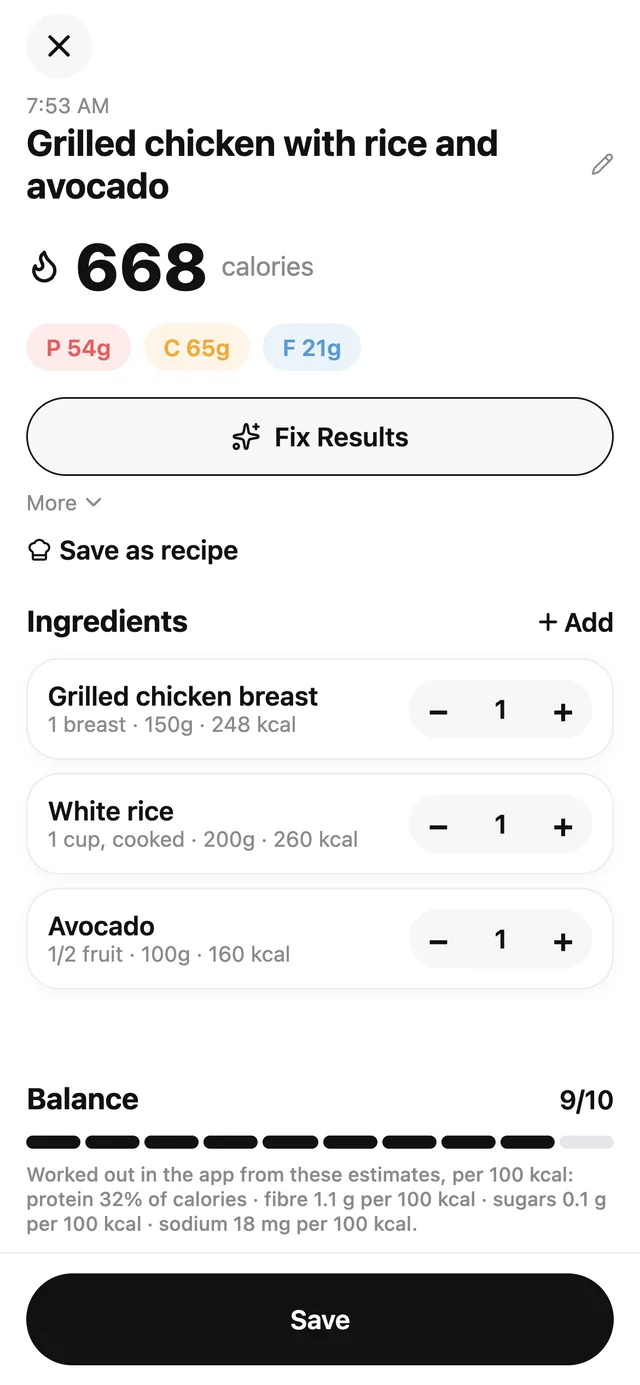
The result screen shows every ingredient with its grams and macros. Nothing is saved until you say so.
- Edit a portion if the grams look wrong.
- Remove an item the AI imagined, or add one it missed.
- Tap Fix Results and say what’s wrong in plain words, such as "that was half a cup of rice, and the dressing was ranch." The AI redoes the analysis with your correction.
Step 4: It’s logged
Save, and the meal joins today’s log on your phone. It counts toward your calorie and macro rings, your home-screen widget and your weekly insights. If you’ve turned on Apple Health or Health Connect sync, the nutrition is written there too.
What a calorie counter by photo can and can’t see
A photo is a good starting point, not a lab test. The camera sees the surface of your food, and some of the calories are hiding below it.
| What trips up a photo | Why | What to do |
|---|---|---|
| Cooking oil and butter | Fat soaks in and often leaves no visible trace | Add a hint like "fried in 1 tbsp butter," or edit the oil line |
| Sauces and dressings | Hard to see how much there is, or what’s in it | Name the sauce in your hint, or adjust its grams |
| Portion depth | A photo from above can’t tell how deep a bowl is or how high rice is piled | Add a side-angle photo, or edit the grams |
| Mixed dishes | Stews, curries and casseroles hide their ingredients | Describe what’s in it, or save it once as a recipe |
| Packaged foods | Brand recipes vary | Use the barcode scanner or the nutrition label scanner instead |
The more you tell it, the better it does. Even so, treat every number as an estimate you can correct, not a verdict. If you want the research on how accurate AI calorie trackers are, our AI food tracking guide collects it.
Where your data goes
Your food log, photos, weight and nutrition data are stored on your phone. Lettuceburn is a calorie tracker with no account required. What happens when you scan depends on how you power the AI.
Free lane: your own AI key
You add an API key from Anthropic (Claude) or OpenRouter, and it’s stored in your phone’s secure storage. When you scan, your photo goes from your phone straight to the provider you picked, under that provider’s terms. It never passes through Lettuceburn’s servers.
Pro: no key needed
Your photo travels from your phone to Lettuceburn’s server, which sends it to the AI model through OpenRouter and passes the result back. OpenRouter and the model provider behind it process the photo under their own privacy policies. The server stores no photos and logs no nutrition. It keeps only a per-day count of analyses and token totals for your account, so it can apply usage caps. Pro is a monthly subscription after a 1-week free trial — or bring your own key, free forever.
Either way, the meal you save stays on your phone. The full details are in our privacy policy, and the two lanes are compared on the pricing page.
Try it when it launches
Lettuceburn is coming soon to iPhone and Android. Join the waitlist to hear the day it’s ready, or see everything the app does.
Frequently asked questions
How does AI calorie counting work?
A vision AI model looks at your photo, names each food and ingredient, and estimates its weight from visual cues like plate size and standard portions. Lettuceburn then has it work out the nutrition per ingredient, and adds the meal total up from those ingredients.
How accurate is a calorie counter by photo?
It’s an estimate. Photos can’t show hidden oil, sauces or how deep a bowl is, so results can be off, especially for mixed or restaurant dishes. That’s why every result is editable, and why we don’t publish an accuracy percentage. For the research on this, see our guide to AI food tracking.
Do I need an account to use Lettuceburn?
No. Lettuceburn is a calorie tracker with no account required, and there’s no sign-up. Pro and the Friends League use an anonymous ID created in the background, and signing in with Apple or Google is optional; it only carries Pro and the Friends League to a new phone.
Which AI model does Lettuceburn use?
On the free lane, you choose: Anthropic’s Claude with your own key, or a model of your choice through OpenRouter. On Pro, Lettuceburn picks a vision model and runs it through OpenRouter for you, so you don’t need a key.
Can I log food without the AI?
Yes. Food search, the barcode scanner, favorites, recipes, custom foods and copying a past day all work without an AI key. Only photo and label scans, typed or spoken descriptions, and Fix Results use the AI. With a key, the weekly review can also add a short written summary.